The Voxel WordPress theme is a powerful, flexible tool for building dynamic websites—especially those centered around memberships, listings, or directories. Its custom post types, conditional visibility, and user flow control make it ideal for managing who can see what content.
However, sometimes you may need to grant access to a specific page without requiring the user to log in, register, or upgrade their membership. This could be for previewing premium content, granting temporary access to a partner, or testing a restricted area of your site.
The solution? A secure URL access key—a simple passcode added to a URL that unlocks a normally protected page or section.
Why Use URL Access Keys?
In many scenarios, managing user roles and memberships can be overkill for short-term or limited access. With URL-based access keys, you can:
Share private pages easily – Let clients, collaborators, or reviewers access content without needing an account.
Temporarily unlock premium content – Give someone a sneak peek of paid or members-only material.
Bypass complex permission rules – Skip role changes or tier upgrades for one-time or low-risk access.
This method is especially helpful for marketing teams, onboarding processes, and strategic content sharing where simplicity and control are key.
How It Works
The logic behind URL access keys is simple and effective:
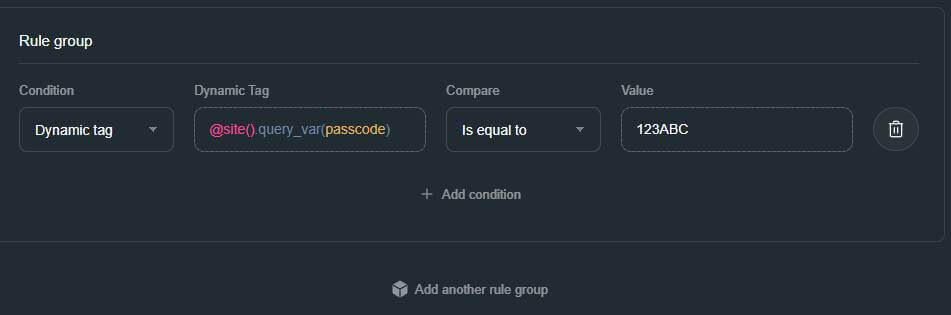
Add a Voxel Visibility Condition to the page or container you want to grant access to using a Site query variable that you define – passcode is the variable in the example below.
Show if > Dynamic Tag > Site Query Variable(your-variable) = Static or Dynamic Passcode
Static code: You define this at the template level
Dynamic code: Reference a Custom Field Value. This allows each post author to add unique passcodes for page access.
This approach ensures that only users with the correct key can access the content, without requiring authentication or account-level changes.
Conclusion
URL access keys offer a simple way to unlock restricted content in the Voxel theme—without logins or membership changes. They’re perfect for sharing private pages temporarily with clients, partners, or testers.
Want this set up on your site? Need help implementing this or customizing your Voxel site? Get in touch here.
Displaying parent categories with their child categories grouped underneath in Voxel is difficult and not directly supported by default term feed options. To achieve this, you need to use a term loop workaround that allows child terms to be looped inside a parent term preview. The steps below show how to do this using native […]
Voxel Framework is a new WordPress plugin in development that brings Voxel’s features to Bricks Builder and Gutenberg. While Voxel can create custom post types, taxonomies, and custom fields — and supports powerful dynamic data, conditional logic, and visibility rules — its real value goes far beyond content structure. Details below are speculative based on […]